Profile generation methods
Before even starting a Xsection, you have to know, what CREATION_METHOD would you like to use for profile generation.
There are 3 available profile creation options (or methods) to choose from:
- AUTO: automatic profile generation based on generic parameters and DEM values.
- LINES: generation based on a line shapefile containting predefined cross sections and DEM values.
- MEASUREMENTS: parsing the shapefile, containing the geodetic surveying points - no DEM sampling.
Each creation method requires a different set of input parameters. Below we discuss each possible option:
AUTO
This is the simplest available profile creation method, as it doesn’t require any existing point measurements or hand-drawn cross section lines as an input. Profile locations are generated automatically along the river lines according to the specified creation parameters:
- A parameter
PROFILE_DENSITYdefines the distance between the autogenerated profiles. Defaults to 200 meters. - A parameter
PROFILE_WIDTHdefines the desired width of a cross section profile. Profile will stretch half this distance on each side of the river center-line. Defaults to 100 meters.
All profiles are generated perpendicular to the river line, starting almost at the beggining of the river, ending almost at the end of the river and with an evenly spaced linear distance from each other.
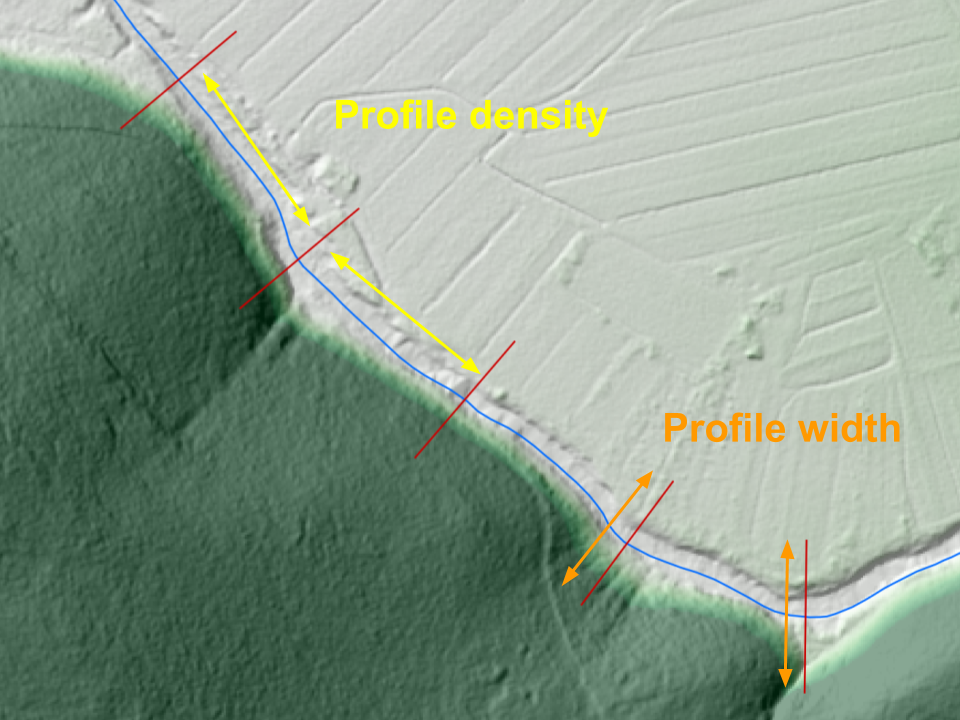
Parameters, required for a fully automatic profile generation
Warning
Mind that such a mindless cross section generation comes with a (besides poorly defined river geometry) a very probable breaking of the “only one river at one point” rule, especially with very dense placement on wide profiles on a very curvy river stream lines. All cross sections with ambiguous chainage definition get assigned a chainage 0.
LINES
This creation option requires an existing Line Shapefile with possibly manually created cross section locations. This option gives you more freedom and accuracy in catching the hydraulic situation of the terrain, compared to “auto” cration method. You can use QGIS to carefully place every single cross section at the exact location that you find important for the performance of your model, as well enables you to avoid cris-crossing of the profiles. Profile names will be automatically generated. Mind the “only one river at one point” rule!
MEASUREMENTS
This creation options is a bit specific as it is the only one that doesn’t include gathering elevation data from DEM.
It actually servers as a parser of the geodetic survey points, passed to a program in a form of a point shapefile
XSECTION_SHP. Therefore the Shapefile requires quite a rigid structure to ensure points get parsed correctly.
Let’s see the required parameters:
XSECTION_PROFILE_ID_FIELDis a shapefile field, containing a name of the profile that certain point belongs to.SECTION_POINT_ID_FIELDis a shapefile field, contaning a consecutive number (order) of the certain point within a profile.Z_FIELDis a shapefile field, containg an evelation (height) value of the certain point.